How to disable or delete a firewall
All firewall management actions are available in the Firewall overview section of the Customer Panel.
Disabling a firewall
To disable a firewall:
- Go to the Firewall tab.
- Locate the firewall you want to disable.
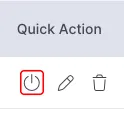
- Click the "shutdown" icon marked in red shown below under Quick Action.
Disabling a firewall will stop applying its rules to all assigned instances.
Deleting a firewall
To permanently remove a firewall:
- Go to the Firewall tab.
- Locate the firewall you want to remove.
- Click on the bin icon below marked in red under Quick Action.
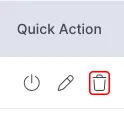
⚠️ Important: Deleting a firewall permanently removes all its rules and cannot be undone.
Was this article helpful?
That’s Great!
Thank you for your feedback
Sorry! We couldn't be helpful
Thank you for your feedback
Feedback sent
We appreciate your effort and will try to fix the article
