How do I change my billing address?
To change your billing address:
1. Log in to the Customer Control Panel
2. Click on the person icon in the top right corner, then click Customer Details.
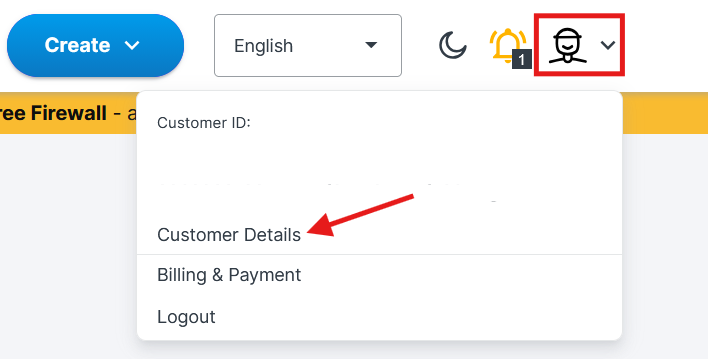
3. Enter the new street, city and zip code. If your billing address differs from your personal address on your private account, scroll down and tick Billing address differs, then click Continue to Billing Address and enter the billing address details.
4. Once you've made your changes, click the Confirm button.
The new address will be used for future invoices. It is not possible to adjust the invoice address on existing invoices.
Was this article helpful?
That’s Great!
Thank you for your feedback
Sorry! We couldn't be helpful
Thank you for your feedback
Feedback sent
We appreciate your effort and will try to fix the article
