How do I chat with Contabo Customer Support?
To chat with our AI assistant, you need an active Contabo customer account, and you need to be logged in to the Customer Panel.
If you can't access the Customer Panel, please follow the instructions in this article: My account might have been compromised, what should I do?
1. Go to the new Customer Panel.
If you have not logged in to the new Customer Control Panel before, please log in to the original Customer Panel, and click the blue Go to new.contabo.com button at the top right of the page to create login credentials for the new Customer Panel (see I can’t log in to the Contabo Customer Panel if you're having trouble accessing it).
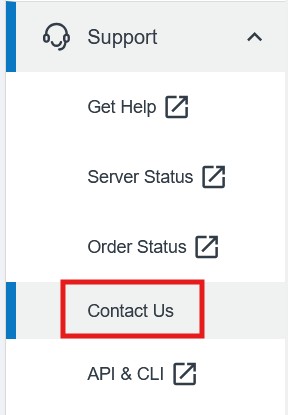
2. Click on the Support drop-down in the left-hand menu, then choose Contact us. Or simply click here to access the Contact us page, then click Chat with us.
Unable to access your Customer Panel?
If you have lost access to your Customer Panel, you can use our Account Recovery process:
https://contabo.com/en/account-recovery/
To ensure the fastest assistance possible, all customers should contact us through our chat or our ticket submission form in their Customer Panel. If you are unable to use these support options (for example, because you are not a customer yet or you cannot access our support channels), you may contact us via email.
Please note that this email address is intended exclusively for pre-sales requests and exceptional cases. Any other support requests submitted to support@contabo.com will be redirected to our standard support channels or may not be processed at all. Requests submitted through the Customer Panel are prioritized, while emails are processed with significantly lower priority.
Was this article helpful?
That’s Great!
Thank you for your feedback
Sorry! We couldn't be helpful
Thank you for your feedback
Feedback sent
We appreciate your effort and will try to fix the article
