How to contact Contabo Customer Support?
To contact customer support, you need an active Contabo customer account, and you need to be logged in to the Customer Panel.
If you can't access the Customer Panel, please follow the instructions in this article: My account might have been compromised, what should I do?
1. Go to the Customer Panel.
See I can’t log in to the Contabo Customer Panel if you're having trouble accessing it.
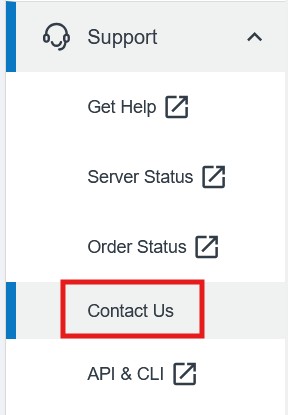
2. Navigate to Support on the left, then choose Contact us from the drop-down. Or simply click here to access the Contact us page.
Unable to access your Customer Panel?
If you have lost access to your Customer Panel, you can use our Account Recovery process:
https://contabo.com/en/account-recovery/
To ensure the fastest assistance possible, all customers should contact us through our chat or our ticket submission form in their Customer Panel.
Was this article helpful?
That’s Great!
Thank you for your feedback
Sorry! We couldn't be helpful
Thank you for your feedback
Feedback sent
We appreciate your effort and will try to fix the article
