How can I revoke a cancellation of my product?
If you have previously cancelled a product but changed your mind, you can revoke the cancellation directly in the Customer Control Panel. You can revoke a cancellation if the termination date has not been reached yet.
How to revoke a cancellation in the Customer Control Panel
- Log in to your Customer Control Panel
- Navigate to Servers & Hosting
- Select the product you previously cancelled (see How can I close my Contabo account or cancel a Contabo service?)
- Click on the more options menu (three vertical dots) next to the relevant product
- Click on “Revoke cancellation”
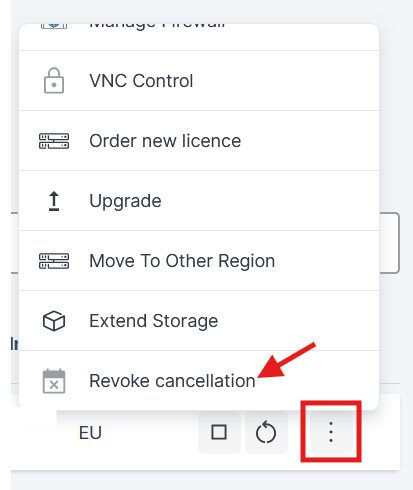
6. Confirm your action by clicking the red Revoke Cancellation button.
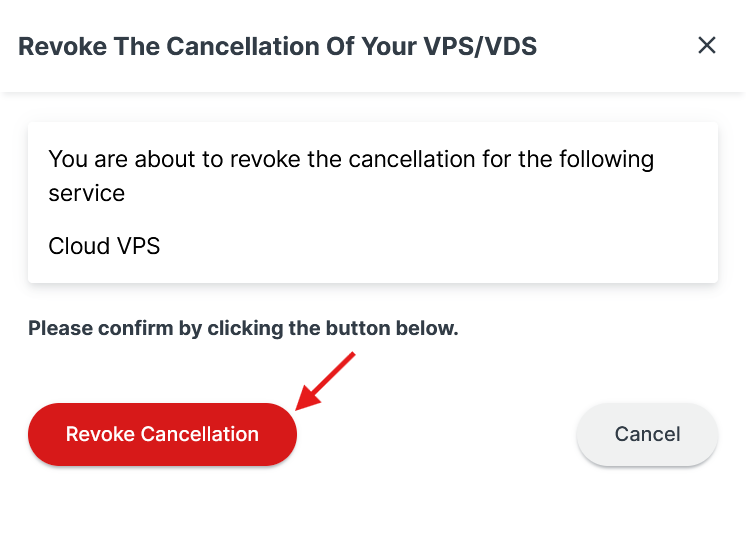
Note: After revoking your cancellation, you will be charged for the service upon the renewal date.
Related articles:
Was this article helpful?
That’s Great!
Thank you for your feedback
Sorry! We couldn't be helpful
Thank you for your feedback
Feedback sent
We appreciate your effort and will try to fix the article
