I have accidentally ordered a Contabo product, can I cancel the order?
TABLE OF CONTENTS
Cancelling an unpaid order
If you haven't paid for your order yet, you can cancel it the following way:
1. Log in to the Control Panel
Log in to new.contabo.com
2. Navigate to 'Unpaid Orders' section
- Click 'Account' on the left hand side
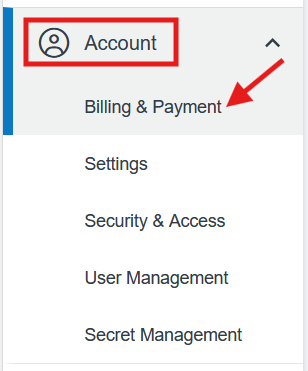
- Choose 'Billing & Payment' from the drop-down
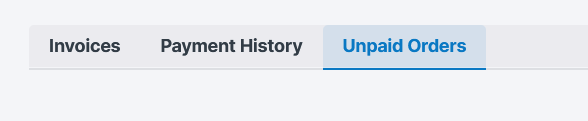
- Click Unpaid Orders
3. Cancel the order
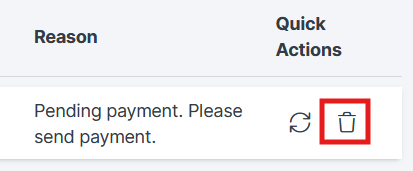
Click the cancel icon under 'Quick Actions'
4. Confirm cancellation
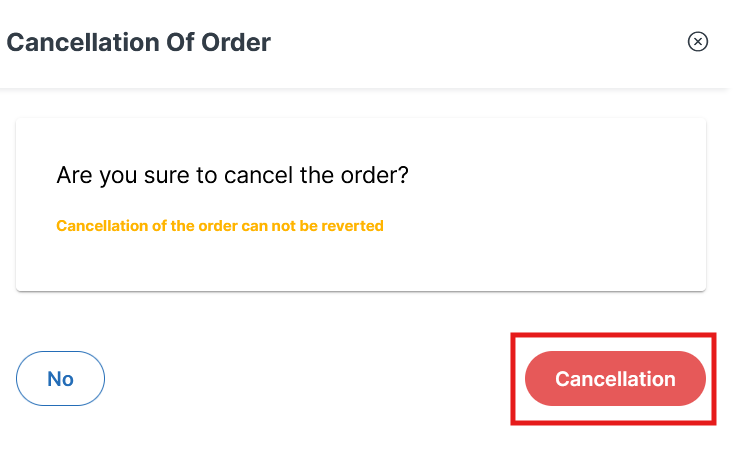
Click the 'Cancellation' button to confirm the order cancellation.
Cancelling a paid order
If the order has already been paid for, please contact support.
When you contact support, they may ask you to verify some basic information, please respond to this verification request as soon as possible to make this process as quick as possible.
See How can I close my Contabo account or cancel a Contabo service? for more information.
Was this article helpful?
That’s Great!
Thank you for your feedback
Sorry! We couldn't be helpful
Thank you for your feedback
Feedback sent
We appreciate your effort and will try to fix the article
