How can I change my account type?
You can change your account type in the Customer Panel at any time.
For example, you may want to switch from Private to Business to add company details or a VAT ID.
How to change your account type:
Log in to the Customer Panel
Click on the person icon in the top right corner, then click Customer Details.
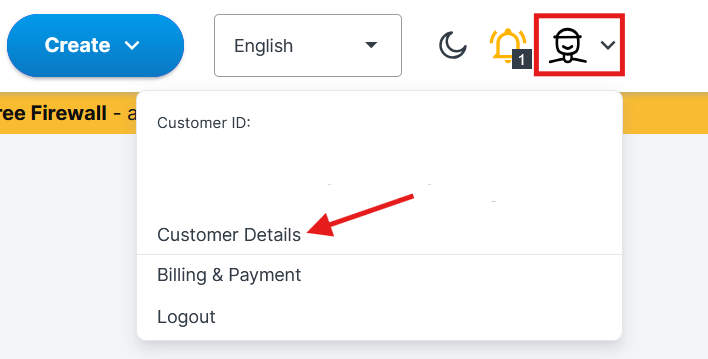
At the top of the Customer Details page, choose Private or Business.
Please note that if you're changing your account to Business, it is required to enter your Tax ID.Scroll down and click Confirm.
Notes:
Changing the account type does not modify invoices that were already issued.
If you switch to a Business account, make sure your company name and VAT ID are entered correctly.
The change applies to future invoices only.
Was this article helpful?
That’s Great!
Thank you for your feedback
Sorry! We couldn't be helpful
Thank you for your feedback
Feedback sent
We appreciate your effort and will try to fix the article
