What is the Customer Panel and how do I access it?
What is the Customer Panel?
The Customer Panel is your interface for interacting with your Contabo products, ordering new products and managing your Contabo account and billing details.
How do I access the Customer Panel?
Open my.contabo.com and log in with your email address and password.
Your Customer Panel credentials are also used to log in to the Contabo Help Desk.
Please keep in mind that if you do not have an active subscription, you won't be able to access the Customer Panel. To access the panel again, you’ll need an active subscription (for example, by placing a new order).
Having trouble logging in? See: I can’t log in to the Contabo Customer panel.
Used the old customer panel before? See: Migrating to the new Customer Panel.
How do I control my server with the Customer Panel?
Depending on the product you have purchased, select it from the 'Servers & Hosting' drop-down menu.
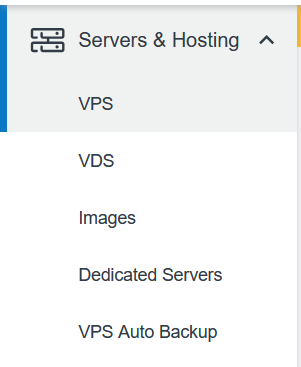
These pages allow you to perform key actions to control your server, such as starting or stopping your servers, starting a rescue system or creating a snapshot (VPS only).
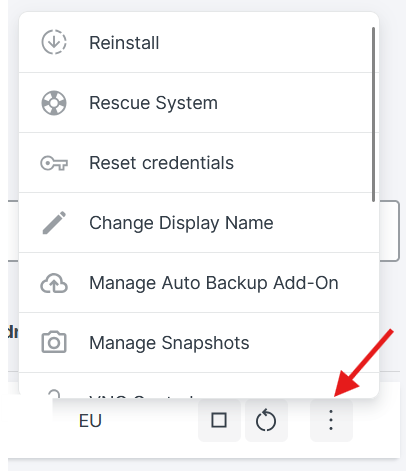
Using a Dedicated Server? Dedicated Server features that were previously in the old panel are now in a separate area, which you open from the corresponding menu item in the Customer Panel. See Migrating to the new Customer Panel for details.
How do I find my billing and payment details in the Customer Panel?
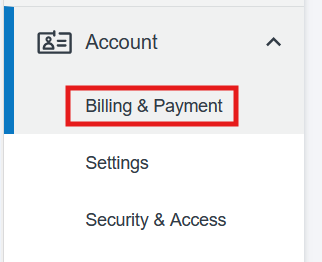
The Billing & Payment page allows you to view your payment history, current balance and your invoices. You can also manage your payment method or top up your balance.
To access it, click on 'Account' on the left side and choose 'Billing & Payment' from the drop-down menu.
Was this article helpful?
That’s Great!
Thank you for your feedback
Sorry! We couldn't be helpful
Thank you for your feedback
Feedback sent
We appreciate your effort and will try to fix the article
