I would like to check the status of my refund
Once you receive confirmation about a refund, it may take up to 5 business days for the refund to be received.
If you have an active subscription, you can check if the refund has been issued:
1. Log in to the Customer Panel
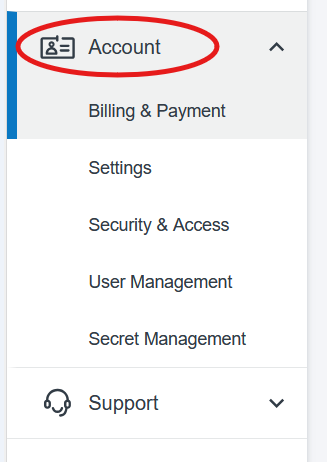
2. Click on the ‘Account’ drop down on the left, then choose ‘Billing & Payment’
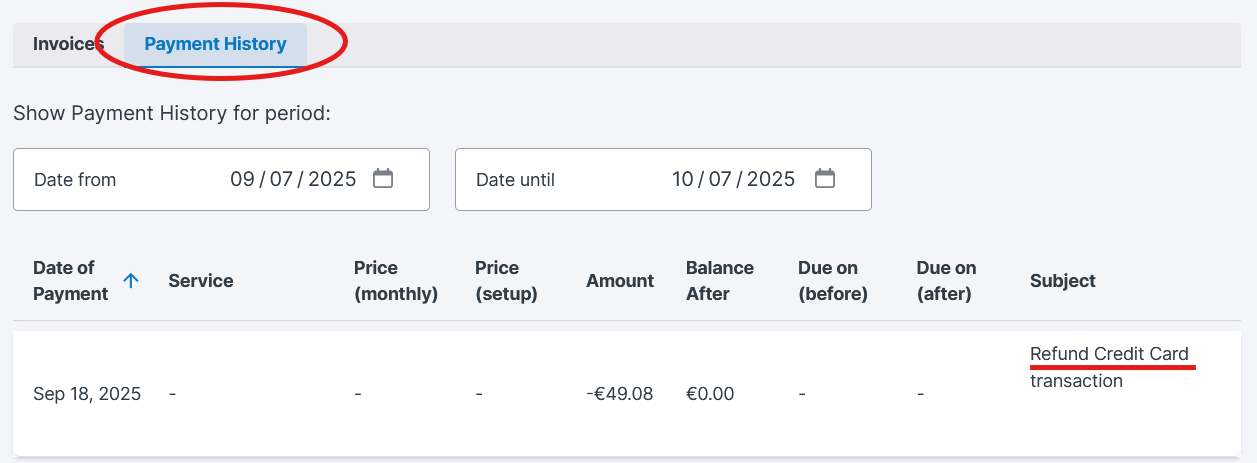
3. Click on ‘Payment History’. If your refund has been issued, you will see it under the ‘Subject’ section.
If your refund hasn’t been issued or you haven’t received it, please contact support.
Was this article helpful?
That’s Great!
Thank you for your feedback
Sorry! We couldn't be helpful
Thank you for your feedback
Feedback sent
We appreciate your effort and will try to fix the article
